Volume Control
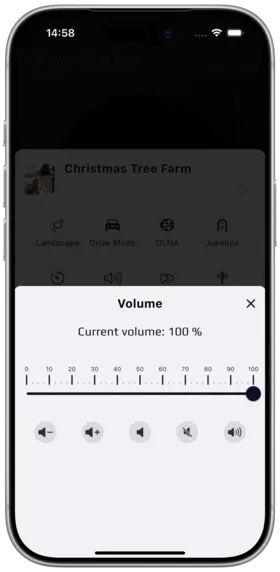
Description
Volume control allows precise playback volume adjustment, featuring a slider, quick buttons, and one-tap mute.
How to Use
- Enter the full-screen player
- Find the "Volume" adjustment button
- Drag the slider or tap quick buttons to adjust volume
- Current volume percentage is displayed in real-time
Controls
| Control | Description |
|---|---|
| Drag Slider | Manually fine-tune the volume |
| - | Decrease volume each tap |
| + | Increase volume each tap |
| Reset | One-tap restore default volume |
| Min | Jump directly to minimum volume |
| Max | Jump directly to maximum volume |
| Mute | One-tap mute / unmute |
Notes
- Volume control is in-app volume, does not affect system volume
- Moving the volume slider while muted automatically unmutes
- Desktop version supports keyboard shortcuts
Use Cases
- Lower volume for late-night listening
- Quick mute when answering calls
- Precisely control volume to protect hearing
Related Documents
Copyright
License under:Attribution 4.0 International (CC-BY-4.0)