Crossfade
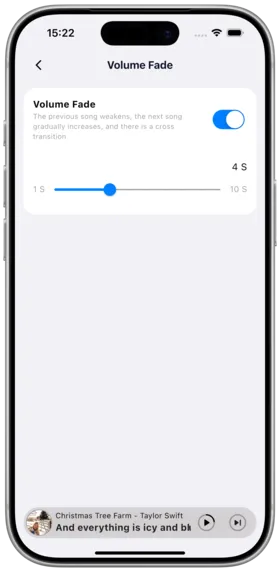
Description
Crossfade gradually fades out the current song while the next song fades in, creating smooth transitions for a better listening experience.
How to Use
- Go to Settings → Player
- Find the "Crossfade" setting
- Set the transition duration: 1–12 seconds
- The crossfade effect will be heard when switching between songs
Duration Suggestions
| Duration | Best For |
|---|---|
| 1–3 seconds | Daily listening, subtle transitions |
| 4–6 seconds | Album playback, natural flow |
| 7–12 seconds | DJ mix style, prominent crossfade |
Gapless Playback
⚠️ Under Development: Gapless Playback has not been implemented yet. Currently only Crossfade is supported.
Notes
- Crossfade effectiveness depends on the audio file's ending and beginning characteristics
- Some formats (e.g., seamless albums) work better
- Crossfade may be affected when using transcoding
Use Cases
| Scenario | Recommended Duration |
|---|---|
| DJ Mixing | 6–12 seconds |
| Album Playback | 3–5 seconds |
| Daily Listening | 1–3 seconds |
Related Documents
Copyright
License under:Attribution 4.0 International (CC-BY-4.0)