Listening Report
Description
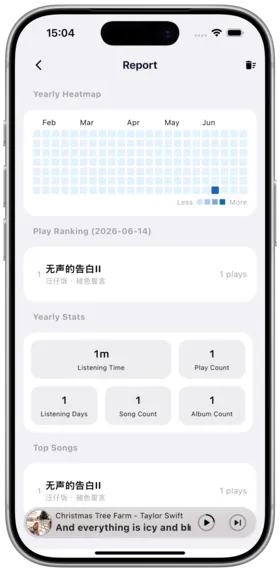
The Listening Report feature analyzes your music playback data and generates intuitive visual reports, helping you understand your music listening habits.
Feature Overview:
- Statistics on total play count and listening time
- Analysis of most-listened songs, albums, artists
- Playback trends over time
- Personalized listening reports
How to Use
Viewing the Report
- Open Amcfy Music
- Go to the "My" page in the navigation bar
- Tap "Report" to enter the report page
Report Contents
| Statistic | Description |
|---|---|
| 📊 Total Plays | Cumulative song play count over all time |
| ⏱️ Total Listening Time | Total listening duration, precisely recorded |
| 🎵 Most Played Songs | Ranking of most played songs |
| 💿 Most Played Albums | Ranking of most listened albums |
| 🎤 Most Played Artists | Ranking of most listened artists |
| 📅 Daily Trends | View playback changes by day/week/month |
Resetting Statistics
- Tap "Reset" in the top-right corner of the report page
- This clears all statistics and starts fresh recording
Notes
Tips
Data Privacy: Listening data is stored only on your local device and is not uploaded to any server.
- Statistical Precision: The app precisely records actual listening time; quick song skips are not counted
- Audiobook Exclusion: Since v1.0.19, audiobook playback is excluded from listening reports
- Offline Mode: Playback data in offline mode is also recorded and synced when online
- Multi-Platform Data: Statistics from different servers are recorded independently
- Data Reset: Reset data cannot be recovered; operate with caution
- Time Accuracy: v1.0.19 fixed an issue with incorrect playback time statistics in reports
Use Cases
| Scenario | Description |
|---|---|
| Year in Review | Review a year's listening journey at year-end |
| Music Recommendations | Share your music taste with friends |
| Habit Analysis | Understand your listening habits and preference changes |
| Social Sharing | Share listening report screenshots on social media |
Server Statistics
In addition to local reports, some server platforms also provide statistics:
| Platform | Stats Support | Content |
|---|---|---|
| Navidrome | ✅ | Server-side playback statistics |
| Emby | ✅ | Play counts, active time |
| Plex | ✅ | Play history and rating stats |
| Subsonic | ✅ | Play count (scrobble) |
Tap a server on the connections page to view its statistics.
Frequently Asked Questions
Q: Why does the report data not match my impression? A: Ensure you've updated to v1.0.19+. Older versions may have statistical inaccuracies. You can reset and restart tracking on the report page.
Q: Will data be preserved when switching phones? A: Listening report data is stored locally; manual backup is needed when switching devices.
Q: Why are audiobooks included in statistics? A: Versions before v1.0.19 included audiobooks in statistics; this has been fixed in updates.
Q: How do I export the listening report? A: Currently screenshot sharing is supported; data export is planned.
Q: Are songs listened to offline counted? A: Yes, offline playback data is retained in the cache database.
Q: Can I view reports per server? A: Currently global; server-level statistics can be viewed on each platform's info page.
Copyright
License under:Attribution 4.0 International (CC-BY-4.0)