Amcfy Music Documentation
Notice
This documentation is AI-generated and may contain errors. If you have any questions, please submit an issue on GitHub.
🎵 Introduction
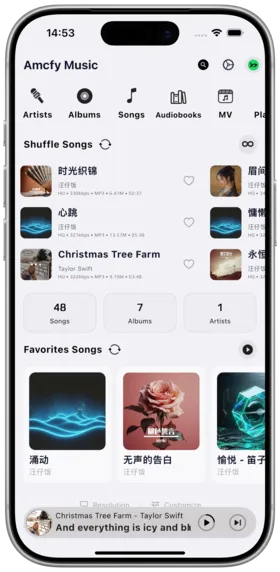
Amcfy Music is a modern cross-platform self-hosted music streaming client. It does not provide any music content itself — instead, it serves as a "universal music client" that connects to virtually all mainstream self-hosted music servers, delivering a unified and elegant playback experience.
🌟 Key Features
- 🖥️ Cross-Platform: iOS, Android, macOS, Windows, Linux
- 🔌 12+ Server Protocols: Compatible with Daoliyu Music, Navidrome, Subsonic, Jellyfin, Emby, Plex, WebDAV, and more
- 🎧 Professional Playback: Gapless playback, Equalizer, AutoEq, Bass Boost
- 📝 Multi-Language Lyrics: Bilingual lyrics, word-by-word lyrics, karaoke mode
- 📻 Audiobooks & MV: Dedicated audiobook player, music video support
- 🚗 In-Car Integration: CarPlay and Android Auto support
- 📡 DLNA Casting: Cast to DLNA devices
- 💾 Offline Mode: Complete offline data engine
- 🌍 14 Languages: English, 简体中文, 繁體中文, 日本語, 한국어, and more
- 🤖 AI Recommendations: Smart playlist recommendations
⚠️ Important Notice
Important Notice
Amcfy Music is a pure player tool that does not provide any music files. You need to set up or own a compatible music server, or use the built-in "Daoliyu Music" backend service.
📚 Documentation Index
| Chapter | Description |
|---|---|
| Quick Start | Installation and initial setup |
| Supported Servers | Complete server compatibility list |
| Connect Server | Adding and managing server connections |
| Music Playback | Playback controls, modes, quality settings |
| Lyrics Display | Multi-language lyrics, word-by-word, karaoke |
| EQ & Audio Effects | Equalizer, AutoEq import, Bass Boost |
| Offline Mode | Download songs/albums/artists/playlists |
| Audiobooks | Audiobook player, chapters, progress sync |
| Music Videos | MV playback and support |
| Playlist Management | Create, edit, import/export playlists |
| Favorites & Ratings | Favorite songs/albums/artists, ratings |
| Search | Global search, advanced search |
| Car Mode | CarPlay and Android Auto |
| DLNA Casting | Cast to DLNA devices |
| Listening Report | Statistics and visualization |
| AI Recommendations | Smart playlist recommendations |
| Settings | Detailed settings guide |
| Desktop Version | macOS/Windows/Linux desktop |
| iOS Shortcuts | Siri shortcut support |
| FAQ | Frequently asked questions |
🚀 Quick Start
- Install: Download from App Store or Google Play — search for "Amcfy Music"
- Recommended Servers: We recommend Daoliyu Music (official partner backend, one-click deploy), followed by Navidrome
- Add Connection: Open app → Navigate to Settings → Add Server
- Enjoy: Log in and start browsing and playing your music
See Quick Start for detailed instructions.
📞 Support
- 🌐 Official Website: https://www.amcfy.com
- 🐙 GitHub: https://github.com/amcfy-music/amcfy-music
- 📧 For issues, check FAQ
Copyright
License under:Attribution 4.0 International (CC-BY-4.0)