AI Recommendations

Description
Amcfy Music features a built-in AI intelligent recommendation engine that generates personalized playlist recommendations based on your listening habits and preferences. Both online and offline modes are supported.
Feature Overview:
- Smart recommendations based on listening history
- Local recommendations in offline mode
- Content category display
- Caching for faster loading
How to Use
Enabling AI Recommendations
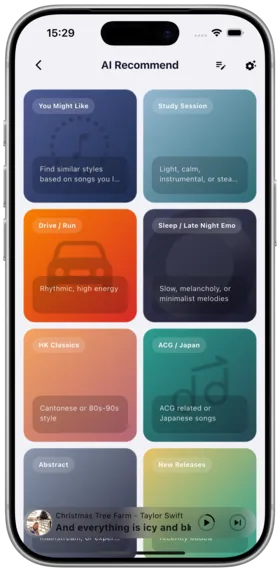
- Open Amcfy Music
- On the homepage, you'll see the "AI Recommendations" module
- If not displayed, add it via "Customize Homepage"
- Tap to enter the AI recommendations page
Recommendation Types
| Type | Description |
|---|---|
| 🎵 Similar Songs | Genre-based recommendations based on current song |
| 🎤 Similar Artists | Artists with similar musical styles |
| 📻 Smart Radio | Infinite playlist generated from seed songs |
| 🔥 Trending | Popular trends based on global playback data |
Online Mode vs Offline Mode
| Mode | Data Source | Recommendation Quality |
|---|---|---|
| Online | Server-side AI computation | ⭐⭐⭐⭐⭐ Best |
| Offline | Local cache algorithm | ⭐⭐⭐ Basic |
In offline mode, AI recommendations use locally cached recommendation data with slightly lower quality but no network requirement.
Notes
Tips
AI recommendation quality depends on your listening data volume and the server-side algorithm capabilities.
- Data Accumulation: New users need some listening data for recommendations to become more accurate
- Caching: AI recommendation results are automatically cached and periodically refreshed
- Offline Limitations: Recommendation variety and quality are limited in offline mode
- Server Dependency: Different server platforms have different recommendation capabilities:
- Daoliyu: Best recommendation experience
- Navidrome/Subsonic: Based on similar songs/artists
- Other platforms: Basic or unavailable
- Privacy: Recommendation data is processed server-side and not shared with third parties
Use Cases
| Scenario | Recommended Usage |
|---|---|
| Discover New Music | Use similar songs/artists to discover new works |
| Background Play | Use smart radio as background music for work/study |
| Playlist Enrichment | Supplement existing playlists with recommendations |
| Offline Scenarios | Use cached recommendation data in airplane mode |
| Party Music | Use trending recommendations for party-appropriate music |
Similar Songs
New in v1.2.1
On any song's detail page or context menu, you can view recommendations similar to that song's style.
How to Use:
- Find a song of interest in the song list
- Long press or tap the context menu
- Select "Similar Songs"
- View the recommendation list and play directly
Similar Artists
New in v1.2.1
On the artist detail page, you can view artists with similar styles.
How to Use:
- Enter any artist page
- Scroll to the bottom to see "Similar Artists"
- Tap to navigate to that artist's page
Configuration Tips
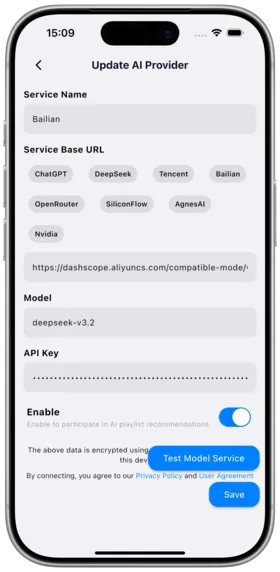
- Heavy Users: Enable online AI recommendations for the best experience
- Casual Users: Keep default settings; recommendations improve gradually with use
- Privacy Conscious: Use offline recommendation mode; data stays on-device
- Multi-Platform Users: Switching between servers may yield different recommendation results
Copyright
License under:Attribution 4.0 International (CC-BY-4.0)