Pitch Control
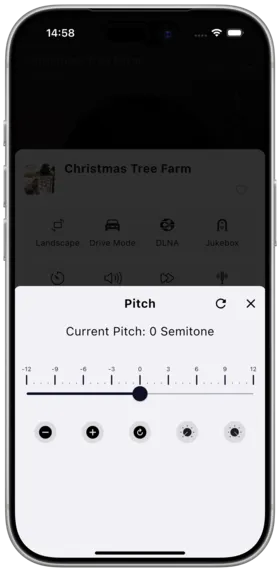
Description
Pitch control allows you to adjust the playback pitch (Key) without changing the speed, ideal for instrument practice and karaoke.
How to Use
- Enter the full-screen player
- Find the "Pitch" adjustment button
- Drag the slider to adjust the pitch value
- Current pitch is displayed in real-time
Adjustment Range
| Range | Description |
|---|---|
| -12 to +12 | Semitone adjustment |
| 0 | Original pitch (normal) |
Notes
- Pitch adjustment is independent of speed control
- Extreme pitch values may reduce audio quality
- Desktop version supports keyboard shortcuts for adjustment
Use Cases
- Karaoke: Adjust songs to a key that suits your vocal range
- Instrument practice: Change key while practicing along with the original
- Music education: Analyze songs in different keys
Related Documents
Copyright
License under:Attribution 4.0 International (CC-BY-4.0)