Favorites & Ratings
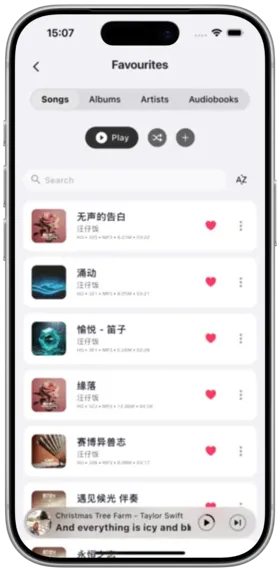
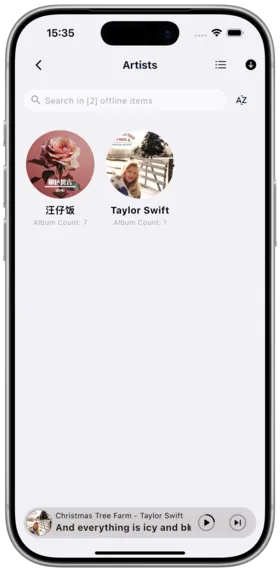
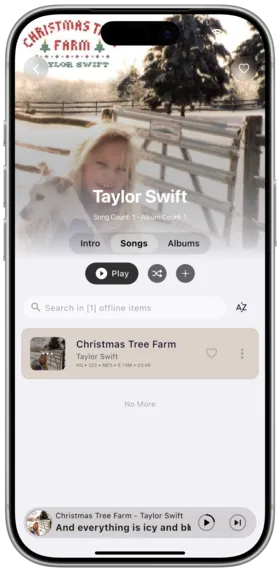
Amcfy Music provides favorites and rating features for songs, albums, and artists, helping you organize and mark your favorite music content.
Favorite Songs / Albums / Artists
Description
Supports favoriting (marking as liked) songs, albums, and artists. Favorited content is displayed in the Favorites page for easy access.
How to Use
Favorite a Song:
- In a song list, tap the "Heart" icon next to a song
- The hollow heart becomes a solid red heart, indicating a successful favorite
- You can also tap the "Heart" icon in the player interface to favorite the currently playing song
Favorite an Album:
- Enter the album details page
- Tap the "Favorite" button (or "Heart" icon) at the top
- The entire album is favorited
Favorite an Artist:
- Enter the artist details page
- Tap the "Follow" or "Favorite" button
- The artist is added to your favorites list
Notes
- The favorites feature requires a connection to a server platform; support levels vary by platform
- Favorite status syncs with your platform account (when supported by the platform)
- Favoriting an artist does not automatically favorite all their songs
Use Cases
- Marking liked songs for quick access
- Favoriting an entire high-quality album
- Following favorite artists to easily check their new releases
Rating System
Description
Supports rating songs, albums, and artists (typically 1-5 stars), helping build a personal music evaluation system.
How to Use
Rate a Song:
- In a song list, tap the rating area (star icon) for a song
- Select a 1-5 star rating
- The rating takes effect and is saved immediately
Rate an Album:
- On the album details page, tap the rating area
- Select a rating
- The overall album rating is saved
Rate an Artist:
- On the artist details page, tap the rating area
- Select a rating
- The artist rating is saved
Notes
- The rating feature depends on platform support; support varies by platform (see below)
- Ratings can be modified at any time
- Unrated items display as empty stars by default
Use Cases
- Building a personal music rating system
- Filtering highly rated songs to create curated playlists
- Quickly identifying low-rated songs for cleanup
Favorites Page Sorting
Description
The Favorites page supports multiple sorting methods, making it easy to browse favorited content by different dimensions.
How to Use
- Navigate to the Favorites page via the bottom navigation bar
- The top of the page displays category tabs: Songs, Albums, Artists, Audiobooks
- Tap the sort button to choose a sorting method:
- By date added (newest first)
- By name (A-Z)
- By rating (highest to lowest)
- By play count (most to least)
Notes
- Sorting only affects the current display and does not change the actual favorites order
- Sort options may vary slightly between categories
Use Cases
- Viewing recently favorited songs
- Browsing high-quality content by rating
- Quickly finding the most-favorited artists
Platform Support Differences for Favorites & Ratings
Description
Different server platforms have varying levels of support for favorites and rating features. The differences are listed below.
Platform Comparison
Subsonic API (Generic):
- Favorite songs: Supported (via Star mechanism)
- Favorite albums: Supported
- Favorite artists: Partially supported (depends on specific server implementation)
- Ratings: Partially supported (requires server to enable rating feature)
Navidrome:
- Favorite songs: Fully supported
- Favorite albums: Fully supported
- Favorite artists: Fully supported
- Ratings: Fully supported (1-5 stars)
Emby / Jellyfin:
- Favorite songs: Supported (via Favorite marker)
- Favorite albums: Supported
- Favorite artists: Supported
- Ratings: Supported (Emby uses Like/Dislike, Jellyfin supports 1-5 stars)
Audiobookshelf:
- Favorite audiobooks: Supported
- Ratings: Not supported (Audiobookshelf has no rating mechanism)
WebDAV:
- Favorites: Not supported
- Ratings: Not supported (WebDAV is a pure file protocol and does not support metadata tagging)
Notes
- When switching platforms, favorites and ratings from a previous platform will not be automatically migrated
- It is recommended to use the same platform account for the best experience
- Feature support may change with platform version updates
Use Cases
- Choosing the most suitable server platform for your needs
- Understanding feature limitations to plan usage accordingly
Copyright
License under:Attribution 4.0 International (CC-BY-4.0)