iOS Shortcuts
Description
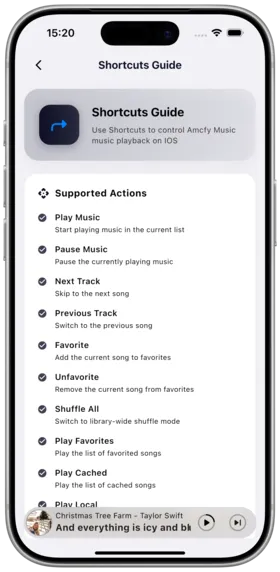
Amcfy Music supports iOS Shortcuts and Siri integration, allowing you to control music playback through voice commands or automations.
Feature Overview:
- Siri voice-controlled playback
- Shortcut automations
- Deep iOS system integration
Supported Shortcut Actions
| Action | Description | Trigger |
|---|---|---|
| Play/Pause | Play or pause current song | Siri / Shortcuts |
| Next Song | Skip to next song | Siri / Shortcuts |
| Previous Song | Go back to previous song | Siri / Shortcuts |
| Play Playlist | Play a specified playlist | Siri / Shortcuts |
| Play Favorites | Play songs from favorites | Siri / Shortcuts |
| Shuffle Play | Start shuffle playback | Siri / Shortcuts |
How to Use
Siri Voice Control
Say the following commands to Siri (examples):
- "Hey Siri, play music with Amcfy Music"
- "Hey Siri, next song in Amcfy Music"
- "Hey Siri, pause Amcfy Music"
- "Hey Siri, play my driving playlist with Amcfy Music"
Creating a Shortcut
- Open the iOS "Shortcuts" app
- Tap "+" in the top-right to create a new shortcut
- Search for "Amcfy Music"
- Select the desired action (e.g., Play Playlist)
- Set parameters (e.g., select target playlist)
- Save the shortcut
Creating an Automation
- Go to the "Automation" tab in the Shortcuts app
- Tap "+" to create a personal automation
- Choose a trigger condition:
- Auto-play when connecting to CarPlay
- Resume playback when connecting Bluetooth headphones
- Auto-play music at a specific time
- Play playlist when arriving at a location
- Add an Amcfy Music action
- Save the automation
Use Cases
| Scenario | Automation |
|---|---|
| 🚗 Auto-Play in Car | Connect CarPlay → Auto-play "Driving" playlist |
| 🎧 Headphones On | Connect Bluetooth headphones → Auto-play favorites |
| 🌅 Morning Music | Daily at 7:00 → Auto-play "Light Music" playlist |
| 🏠 Arrive Home | Arrive at home address → Stop playback |
Notes
- iOS Version: Requires iOS 14.0 or later
- Permissions: Grant permissions in Shortcuts app on first use
- App Running: Amcfy Music needs to run in the background (or be kept by the system)
- Network: Playback requires network connection (unless songs are downloaded offline)
- Siri Language: Use Chinese commands with Chinese Siri, English commands with English Siri
FAQ
Q: Siri doesn't recognize my shortcut? A: Ensure Amcfy Music is installed and has been opened at least once. Re-record the Siri command.
Q: Automation doesn't work? A: Check if trigger conditions are met and "Ask Before Running" is turned off.
Q: Can I create a "Play Recently Played" shortcut? A: Currently supported actions are limited; more actions are being added continuously.
Copyright
License under:Attribution 4.0 International (CC-BY-4.0)