FAQ
Connection Issues
Q: "Connection Failed" when adding a server?
A: Check the following:
- Server address format is correct:
protocol://address:port(e.g.,http://192.168.1.100:4533) - Username and password are correct (case-sensitive)
- Network connectivity: Can your device access the server address (test with a browser)
- Firewall: Is the server port open
- HTTPS self-signed certificate: Enable "Ignore Certificate Verification" in settings
Use Case: Applies whether it's a first-time connection or a previously working connection that suddenly fails.
Q: How to auto-switch between LAN and WAN?
A: Amcfy Music supports automatic LAN/WAN switching (v1.0.17+):
- How to Use: When adding a connection, fill in both LAN and WAN addresses
- How It Works: Automatically uses LAN address on Wi-Fi; switches to WAN address on mobile data
- Notes: Server needs both internal and external network access configured; switching may cause brief loading delays
Q: Can I connect to multiple servers?
A: Yes. Amcfy Music supports multiple server connections:
- How to Use: Tap "Add Connection" multiple times in settings
- Switching: Switch the active server on the connections page or homepage
- Notes: Free version has connection limit; data is managed independently per server
Q: Red dots on homepage or data not refreshing?
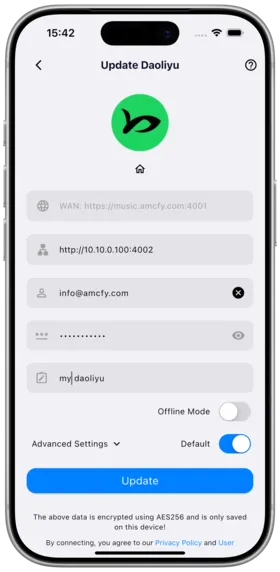
A: You need to manually refresh data from the platform connection page:
- How to Use: Settings → Server → Tap the "Update" button for the target platform
- Effect: Forces a refresh of the platform's music library data (songs, albums, artists, etc.)
- Notes: The update process may take several minutes depending on library size
Playback Issues
Q: Why can't some songs be played?
A: Possible causes:
- Unsupported format: Confirm the file format (MP3/FLAC/AAC/OGG, etc.) is supported
- Corrupted file: Try playing the file with another player
- Transcoding failure: Server transcoding may fail; try disabling transcoding or changing format
- iOS FLAC noise: v1.0.15 fixed iOS FLAC crackling; update the app
- AAC playback: v1.0.14 fixed AAC playback issues; update the app
Q: Stuttering or interruptions during playback?
A:
- Network check: Switch to more stable Wi-Fi or lower transcode bitrate
- Cache check: Check and adjust cache limit in settings
- Background restrictions: Check if battery saver mode is limiting background apps
- Slow decoding: The outer ring on the play button indicates decode progress; slow decoding affects playback
Q: How to enable gapless playback?
A: v1.2.1 Labs feature:
- How to Use: Settings → Labs → Gapless Playback → Enable
- Notes: Dual player switching mechanism; may increase battery consumption; may conflict with certain audio effect settings
Lyrics Issues
Q: Lyrics not showing?
A:
- Ensure song files on the server have embedded lyrics metadata
- External lyric files need to be in the same directory and same name as the song
- Subsonic platform lyrics may lack timestamps (partially fixed in v1.0.20)
- Emby external lyrics may not display (fixed in v1.0.14)
- Plex lyrics may have compatibility issues (refer to version fix notes)
Q: Lyrics out of sync with the song?
A:
- How to Use: Settings → Lyrics → Global lyrics offset → Adjust the offset
- Notes: Offset is in milliseconds, typical adjustment range is -500 to +500
Download/Offline Issues
Q: Can't find downloaded songs?
A:
- Download location: Navigation → Settings → Downloads page
- v1.2.1 optimization: Download list display improved (requires re-download to take effect)
- Clear cache: Check if accidentally cleared in cache management
Q: How to use offline mode?
A:
- How to Use: Settings → Offline Mode → One-key switch
- Prerequisite: Download songs while online first
- Scope: Offline songs, albums, artists, playlists, audiobooks, MVs, folder browsing
- AI Recommendations: Uses local cache in offline mode
Q: Downloads failing or stuck?
A:
- Check storage space
- Check server network stability
- Android special character filenames may cause failures (fixed in v1.0.17)
- Some Android models download failures (fixed in v1.2.0)
Platform-Specific Issues
Q: What's the difference between server platforms?
A: See Supported Servers, key differences:
- Favorites/Ratings: Navidrome/Subsonic/Gonic full support; Plex no favorites
- Delete: Emby/Jellyfin/Koel/Plex supported; Subsonic/Navidrome not supported
- Playlists: Varies significantly by platform
- Audiobooks: Daoliyu, Audiobookshelf dedicated support
Q: How to select Navidrome multiple libraries?
A: Since v1.2.0:
- How to Use: Long press avatar on homepage → Select media libraries
- Multi-select: Can choose any combination of libraries
Desktop Issues
Q: How to update the desktop version?
A: Currently requires manual download from the official download page.
Other Issues
Q: How to share my server connection?
A: Settings → Connections page → Generate share link/QR code → Friends scan to auto-add.
Q: How to report bugs or suggest features?
A: Submit via GitHub Issues.
Q: Are there widgets?
A: Desktop widgets are in planning; both iOS and Android will be supported in future versions.
Q: Device overheating?
A: Since v1.0.18: Disabling vinyl cover effect significantly reduces CPU usage.
Q: Where is my data stored? Is it safe?
A: All listening data, cache, and settings are stored locally on your device. When sharing a server, only connection info is transmitted — account credentials are never leaked.
Copyright
License under:Attribution 4.0 International (CC-BY-4.0)