Speed Control
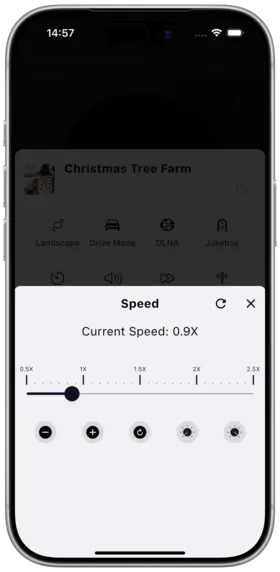
Description
Speed control allows you to adjust playback speed from slow (0.5x) to fast (2.0x), suitable for learning, practice, or quick audiobook listening.
How to Use
- Enter the full-screen player
- Find the "Speed" adjustment button
- Drag the slider or tap preset speed values
- Current speed is displayed in real-time (e.g., 1.25x)
Controls
| Control | Description |
|---|---|
| Drag Slider | Manually fine-tune the speed |
| -0.1x | Decrease speed by 0.1x each tap |
| +0.1x | Increase speed by 0.1x each tap |
| Reset | One-tap restore to 1.0x normal speed |
| Min | Jump directly to minimum speed |
| Max | Jump directly to maximum speed |
Speed Range
| Speed | Use Case |
|---|---|
| 0.5x ~ 0.75x | Slow language learning, instrument practice |
| 1.0x | Normal playback |
| 1.25x ~ 1.5x | Fast audiobook listening |
| 1.75x ~ 2.0x | Quick content browsing |
Notes
- Changing speed affects pitch (unless pitch compensation is enabled)
- Audiobook and music speed settings are saved independently
- Desktop version supports keyboard shortcuts for adjustment
- CarPlay supports speed adjustment and sync (v1.2.0+)
Use Cases
- Slow playback for language learning
- Quickly finishing audiobook chapters
- Adjusting speed for band practice accompaniment
Related Documents
Copyright
License under:Attribution 4.0 International (CC-BY-4.0)