Connection Sharing
Amcfy Music supports quick sharing of server connection configurations between devices, eliminating the need to manually enter addresses and passwords. The feature is divided into Share and Manage workflows.
Description
Connection Sharing allows you to configure all server connections on one device and quickly sync them to another. For example, after setting up your NAS music server on your phone, you can sync it to your iPad with one tap.
Part 1: Enable Connection Sharing
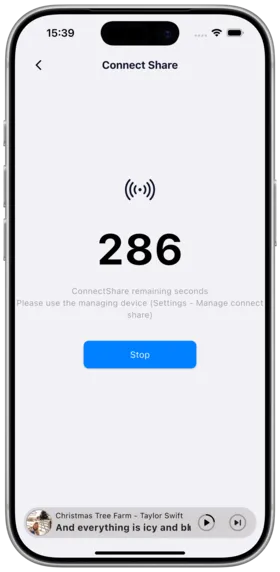
How to Use
- Open Amcfy Music, go to Settings → Server
- Tap "Connection Sharing" to enable
- The device begins broadcasting, waiting for other devices to discover it
Notes
- Valid for 5 minutes; auto-disabled after timeout
- Both devices must be on the same local network
- Re-enable if timed out or disconnected
Use Cases
- Quickly migrate server configurations when switching to a new phone
- Sync music server connections across multiple devices
- Help family and friends quickly configure the same servers
Part 2: Connection Share Management
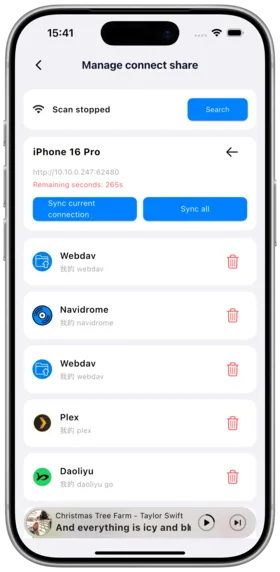
How to Use
- On another device, go to Settings → Server → Connection Share Management
- Tap search to discover devices with sharing enabled
- Once connected, you can manage the target device's server connections
Management Operations
| Operation | Description |
|---|---|
| Delete | Remove a server connection from the target device |
| Add | Add a new server connection to the target device |
| One-Click Sync | Sync all current server connections to the target device |
Notes
- If you see "Please enable connection sharing on the target device", go back and search again
- Connection sharing only works on the local network
- Ensure both devices are on the same Wi-Fi network
- Sharing auto-disables after 5 minutes; re-enable on the target device if needed
Use Cases
- Administrators managing server connections across multiple devices
- Remotely helping family members remove invalid server addresses
- Batch pushing new server configurations to multiple devices
Copyright
License under:Attribution 4.0 International (CC-BY-4.0)